What are GPTs, and how are they different from AI agents?

June 6, 2026

What is a GPT?

A GPT is a customised version of ChatGPT that you configure once for a specific task. Instead of starting every conversation from scratch, a GPT already knows your preferred tone, format, and style - so each response begins closer to what you want.


The problem it solves is simple. If you use AI regularly, you will know the frustration of repeating the same instructions every time. Write in a professional tone. Keep it under 200 words. Always use bullet points. A GPT holds all of that for you permanently.


GPTs vs AI Agents

• GPTs improve your output -they shape responses within the chat interface

• AI agents take action - they operate across tools to complete tasks autonomously

How you set up a GPT

When you create a GPT, you are not changing the AI model. You are shaping how it responds to you. A good setup includes:

• A clear role - what the GPT is for and who it is writing for

• Tone and style instructions - formal, plain, short, detailed

• Examples of good output - show it what done well looks like

• Things to avoid - jargon, filler phrases, over-explanation


The better your setup, the less you need to correct.


Not on ChatGPT?

If you use Google tools, you can create something similar using Gemini Gems. The principle is the same - configure once, reuse often.

A quick example


Without a GPT:

You type: "Turn these notes into a short blog post, keep it simple, use headings, write in plain English, no jargon."

The AI produces something decent. You fix the tone. You remind it about the format. Next time, you repeat all of it.


With a GPT:

You open your GPT and paste the notes. It already knows your style, your format preferences, and what good output looks like. You read the draft and make small edits rather than large corrections.


  • The saving is not just time. It is the mental effort of re-explaining yourself every single session.

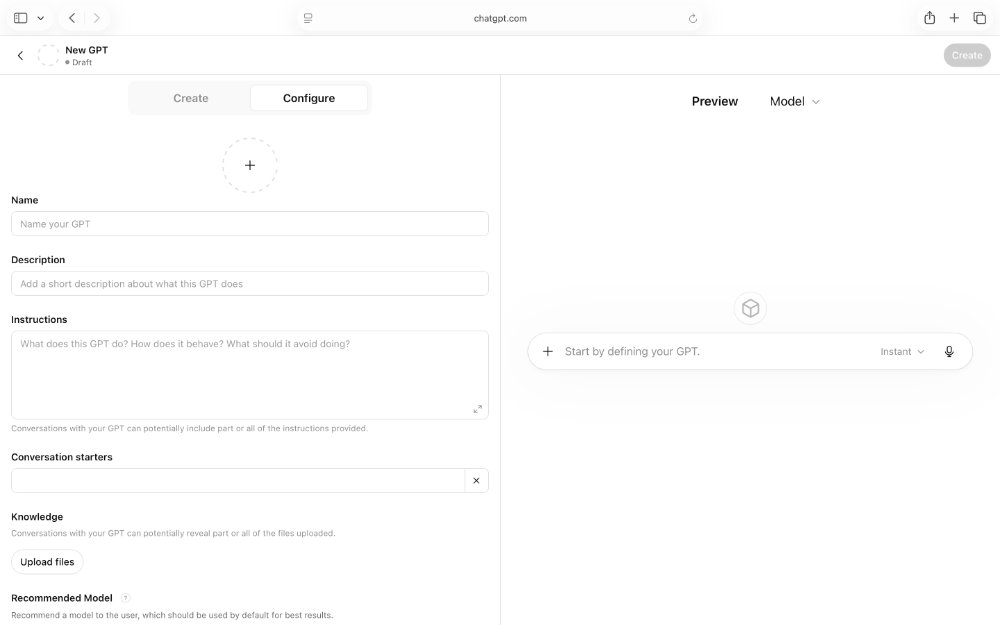
Create your own GPT with instructions

Blurry web app dashboard with a left-side form and a right-side blank preview panel.
GPT's Agent
Respond to prompts Take action on tasks
Focus on output Focus on completion
Stay in chat Work across tools
Low risk Higher impact if wrong

Good GPTs to start with

• Writing assistant - applies your tone and format to any draft

• Research summariser - condenses long articles into key points

• Meeting notes organiser - turns bullet points into a structured summary

• Plain English rewriter - simplifies jargon-heavy text

• Content planner - builds outlines and section structures

• Email drafter - writes professional replies from a few short notes


The best GPTs are tightly focused. One task done well beats a broad assistant that does many things inconsistently.

How to create your first GPT

• Pick one repeatable task you do regularly

• Go to chatgpt.com, click Explore GPTs, then Create

• Give it a name and a clear role description

• Add your tone and format instructions

• Paste in one or two examples of good output

• Test it with a real task and refine based on what it gets wrong


Start narrow. A GPT that does one thing well is far more useful than one that tries to do everything.

At Nova9 we use GPTs regularly - mainly for research, summarising sources, structuring notes and shaping drafts. We also use ChatGPT itself to help write the GPT instructions, which speeds up setup and improves results early on.


The practical outcome is less repetition, fewer corrections, and more time spent on actual work rather than managing the AI.


Agents have their place, and the space is moving fast. But for most everyday tasks, a well-built GPT does the heavy lifting without the added complexity or risk. If you are a Google Workspace user, Gemini Gems works on the same principle and is worth exploring.


Our honest view: start with a GPT. Get good at building one. Then decide whether you need an agent.

Nova9 Tools

Need an idea or a better prompt?

Generate fresh ideas first, or go straight to the Prompt Builder if you already know what you want to create.

Share this article

Nova9 is a place for people who are curious about AI but tired of the hype.

You’ll find honest reviews, practical guides, creative ideas, AI news that actually matters, and simple ways to use modern tools without needing a technical background.

Robot among stacked cardboard boxes in a cluttered market-like scene, with handwritten signs and a pink plush toy.
June 13, 2026
AI browsers can help compare products and summarise reviews, but should they buy for you? Here is why Nova9 recommends using AI before checkout, not during it.
A futuristic office with neon lights and a Microsoft Copilot AI hologram.
June 5, 2026
Explore why Microsoft Copilot is the essential AI productivity tool for office workers. Learn about its integration with Word, Teams, and Outlook.
Colorful four-point star logo with red, blue, green, and yellow gradient on white background
May 31, 2026
Learn how to use Canvas mode in Google Gemini, when it helps, how it compares with ChatGPT Canvas.

Show More